Dashboard Report Use Sql And Range Parameters
Goal: Functional
Developer: Nicolas Micoud and Carlos Ruiz
Description:
It is now possible to use @SQL= notation and set range parameters for embedded report on the home page.
Separator of parameters is the comma
Separator of from/to parameter is the semicolon
Simply fill the Process Parameters field of the Dashboard Content window:
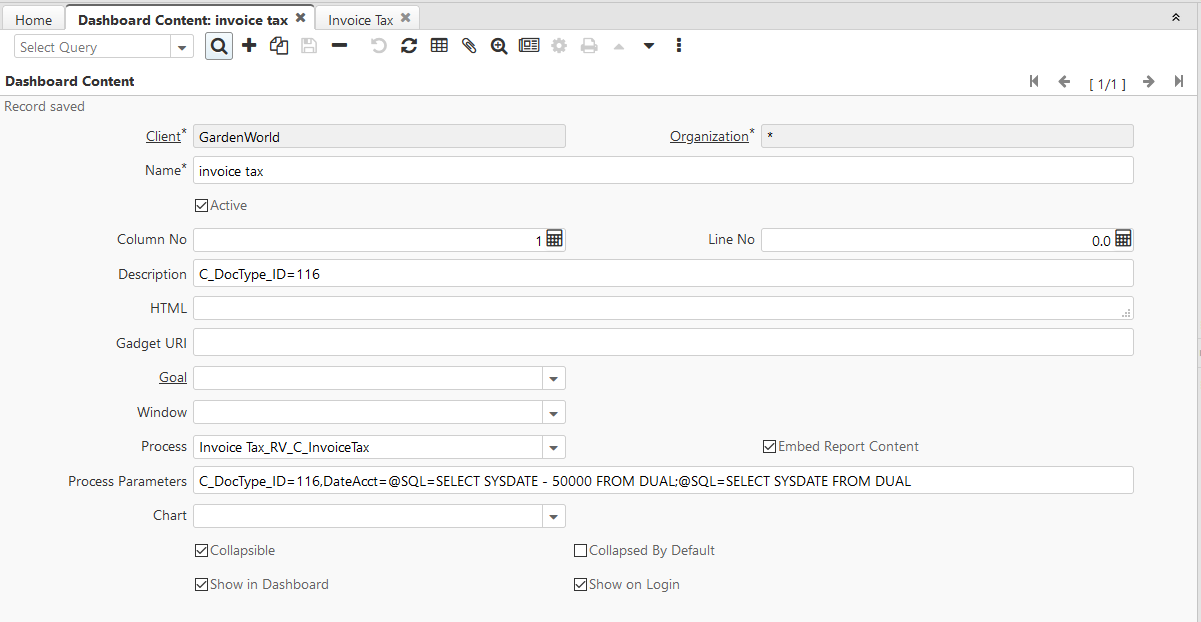
Eg: C_DocType_ID=116,DateAcct=@SQL=SELECT SYSDATE - 30 FROM DUAL;@SQL=SELECT SYSDATE FROM DUAL
It means that the report will filter data
- for Document Type 116
- for dates between D-30 and today
Postgres Example <blockquote>@SQL=SELECT date_trunc('month', NOW()) + interval '1 month' - interval '1 second'</blockquote>
Technical Info: IDEMPIERE-4781
Source: Wiki