Create Window, Tab & Field from Table
Goal: Development - Usability
Developer: Diego Ruiz
Sponsor: BX Service GmbH
Video tutorial:
Description:
The goal of the ticket is to allow system users to create the Window, Tab & Field records automatically from the Table and Column window.
How to do it?
- Once you have created the Table and its respective columns, click on the "Create Window, Tab & Field from table" process button in the toolbar.
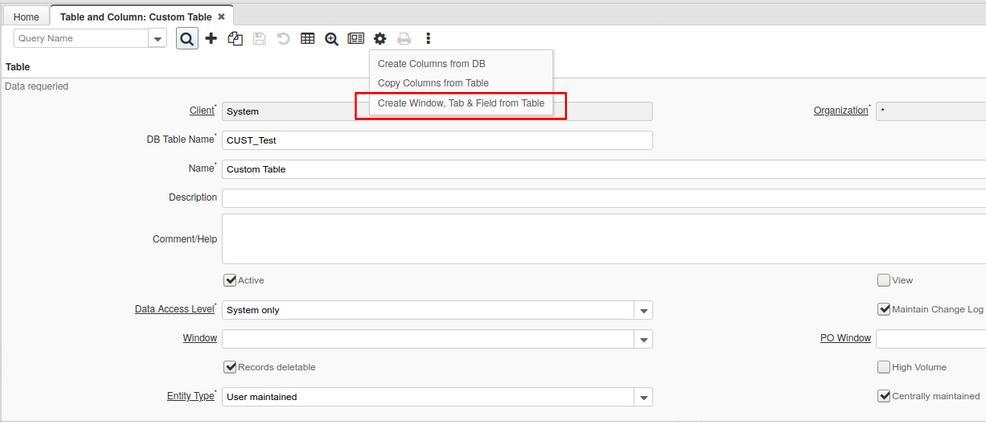
- On the process window, fill the parameters.
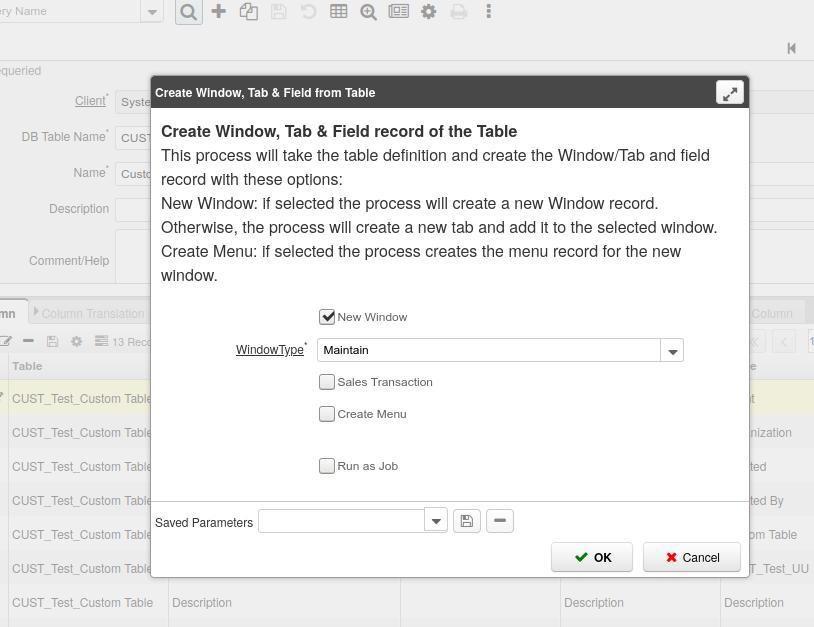
| Parameter | Description |
|---|---|
| New Window | This flag defines if the process creates a new window record or creates a new tab on an existing window |
| Window Type | The Window Type indicates the type of window being defined (Maintain, Transaction, or Query). This field is used only if the New Window flag is checked. |
| Sales Transaction | Indicates if the window is a sales transaction window. This field is used only if the New Window flag is checked. |
| Create Menu | Defines if it creates a new menu entry for the new window. This field is used only if the New Window flag is checked. |
| Window | * You can select to which window you want to add the new tab. This field is used only if the New Window flag is unchecked.* |
| Tab Level | Hierarchical level of the tab. The max value allowed in this field is the maximum tab level of the chosen window + 1. This field is used only if the New Window flag is unchecked. |
- Click on the OK button
- In the end, depending on the selected parameters, you see the result of the process with the links to the records that were created by it. You can navigate to those records and update/check them.
Notes:
- The process creates the new records with the entity type of the Table, except for the fields which have the same entity type of the corresponding column.
- If there's an existing Window in the system which name is equals to the table name, an error will be shown, if you need to create a copy of an already existing table, copy the window record and run the "Copy Window Tabs" process from Window.
- The process will validate that the table has the 7 mandatory iDempiere columns: AD_CLIENT_ID, AD_Org_ID, Created, CreatedBy, Updated, UpdatedBy, IsActive. If the table is missing one or more of those columns, it will throw an error.
- If the table's Window column is empty, the process will set AD_Window_ID = created window ID.
Technical Info: IDEMPIERE-1026
Source: Wiki