User Preferences
Goal: Usability
Contributor: Diego Ruiz - Thomas Bayen - BXService GmbH, Krefeld
Developer: Diego Ruiz
Description:
Now you can configure preferences based on each user/client in the preference popup and the user preference's window.
-
By default the previous preferences are created (AutoCommit and AutoNew).
-
In the popup menu only the fields marked as quick entry in the user preference's window are displayed.
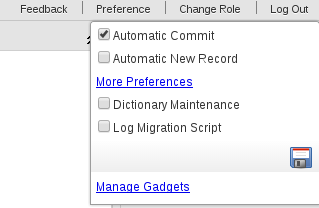
- When you click on the More Preference option, the User Preference's window will be open.
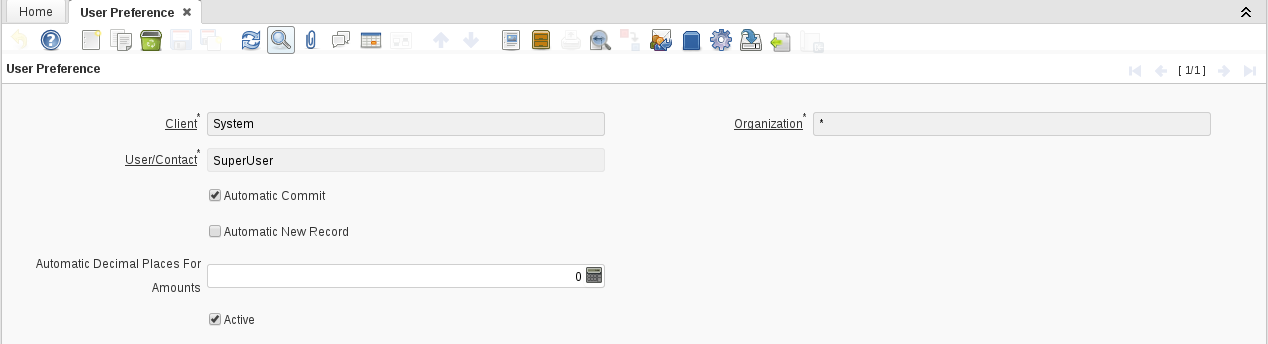
- In the images you can see that Automatic Commit and Automatic New are quick entry and Automatic Decimal Places For Amounts is not.
How to add a new preference:
-
Login as System Administrator.
-
Go to the table AD_UserPreference.
-
Add a new column with the new preference. (Don't forget to synchronize it)
-
Go to the User Preference window record on Window, Tab & Field.
-
Create the new fields on the user preference tab.
-
If you want it to be displayed in the popup menu, mark it as a quick entry. Otherwise you will be able to set it in the user preference window.
-
Now you have your new preference for users.
Technical Info: IDEMPIERE-2556
Source: Wiki