Configurable Info on Login Window
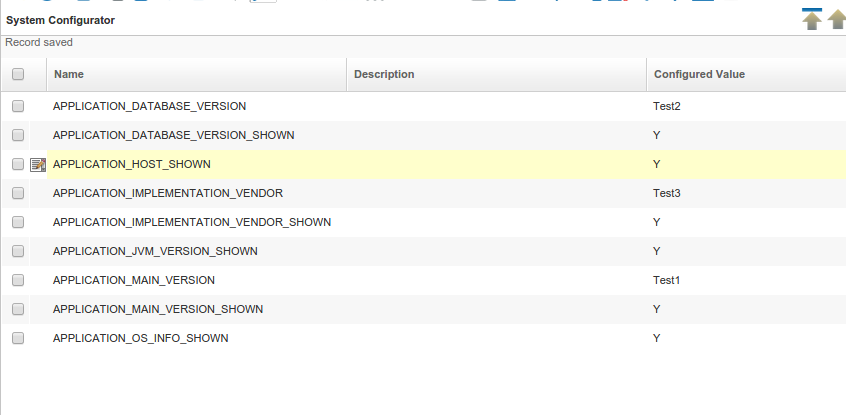
All keys set in the System Configurator
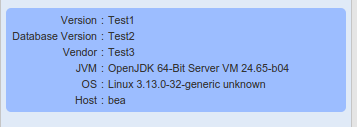
Version Info panel showing all values. Some are overwritten via System Configurator
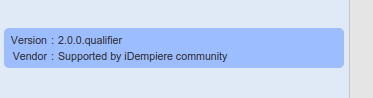
Default settings (no keys are set in System Configurator) in a productive system
Goal: Security
Developer: Jan Thielemann
Description:
The Version Info panel on the login page of iDempieres webui consists of 6 values:
- iDempiere Version
- Database Version
- Implementation Vendor
- Java Version
- Operating System Version
- Hostname of the server
In previous versions of iDempiere, all of those keys were shown, no matter if the system was a productive system or only for testing. With the new feature you now have six new keys for the System Configurator to configure if you want to show a value in the Version Info panel or not. These are boolean keys so you can use 'Y', 'N', 'true' and 'false' as the value.
APPLICATION_MAIN_VERSION_SHOWN
APPLICATION_DATABASE_VERSION_SHOWN
APPLICATION_IMPLEMENTATION_VENDOR_SHOWN
APPLICATION_JVM_VERSION_SHOWN
APPLICATION_OS_INFO_SHOWN
APPLICATION_HOST_SHOWN
If you don't implement the keys in the System Configurator, the default values to show or hide one of the values in the Version Info panel are following:
AD_System.SystemStatus in ('E', 'I') (system is evaluation or implementation):
- Show all values
**AD_System.SystemStatus = 'P' ** (system is production):
- Only show iDempiere Version and Implementation Vendor
Also you now can overwrite some of the values in the Version Info panel via the System Configurator. Use the following keys to provide your own values as a String:
APPLICATION_MAIN_VERSION
APPLICATION_IMPLEMENTATION_VENDOR
APPLICATION_DATABASE_VERSION
Technical Info: IDEMPIERE-2259
Source: Wiki