Desktop Tab Enhancements
Goal: Usability
Developer: Hengsin (talk)
Feature Ticket: IDEMPIERE-4949
Description: Implement the following new enhancement for desktop tab:
- Option to show/hide Home toolbar button for desktop browser. Default to show.
- Option to show/hide Show Open Windows drop down toolbar button for desktop browser. Default to show.
- Option to auto shrink desktop tab to fit more tab to screen without scrollbar. Default to off.
- Make max length of desktop tab title configurable
Usage
- Home toolbar button
-
- ZK_DESKTOP_SHOW_HOME_BUTTON
- ** Y/N type Client level System Config entry, default to Y.
- ** When Y, add Home toolbar button for desktop client (This is an existing feature for mobile client).
-

Home toolbar button
- Show Open Windows drop down toolbar button
-
- ZK_DESKTOP_SHOW_TAB_LIST_BUTTON
- ** Y/N type Client level System Config entry, default to Y.
- ** When Y, add toolbar button to show a list of open tabs for desktop client(This is an existing feature for mobile client).
-

Show Open Windows toolbar button
- Auto shrink desktop tab
-
- ZK_DESKTOP_TAB_AUTO_SHRINK_TO_FIT
- ** When Y, ZK_DESKTOP_SHOW_TAB_LIST_BUTTON is always on regardless of the actual value of ZK_DESKTOP_SHOW_TAB_LIST_BUTTON
- ** When Y, tab scroll button is make hidden, you have to use the tab list dropdown to select tab that's not visible.
- ** When Y, tab will be auto shrink to fit more tabs on screen (similar to how Chrome tabs work).
-
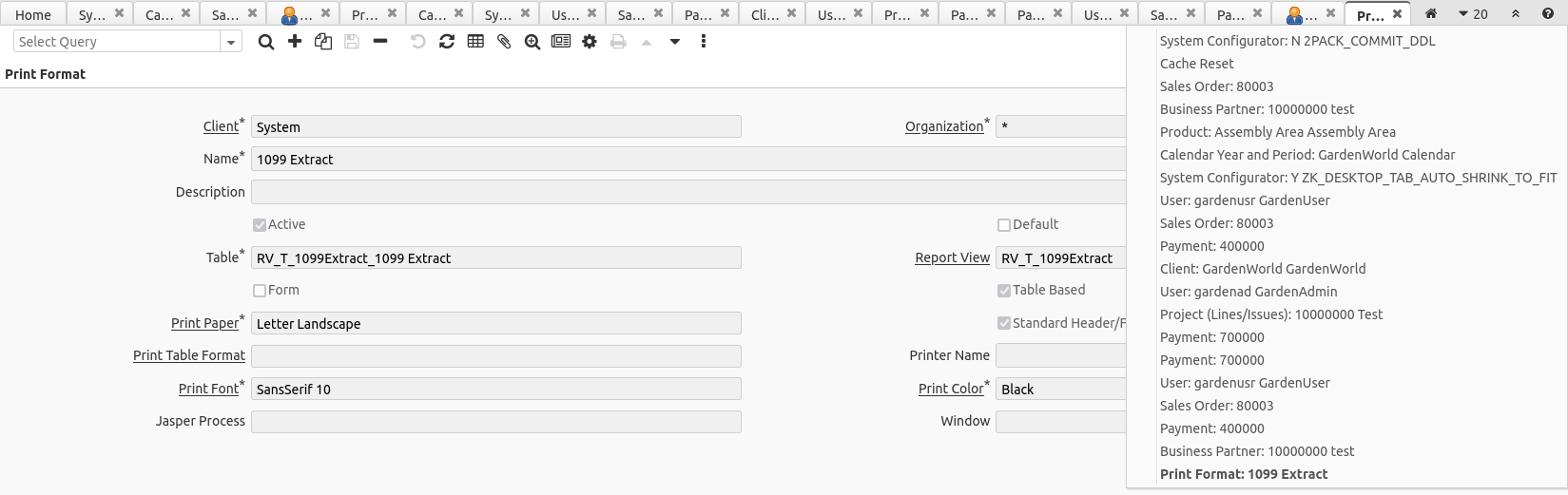
Auto shrink desktop tab
- Make max length of desktop tab title configurable
-
- ZK_DESKTOP_TAB_MAX_TITLE_LENGTH
- ** Integer type Client level System Config entry, default to 30.
- ** Set the maximum length of desktop tab title/label.
Source: Wiki