Advanced Options for Saved Queries
Goal: Technical
Developer: Diego Ruiz BX Service GmbH
Advanced Options for Saved Queries
Overview
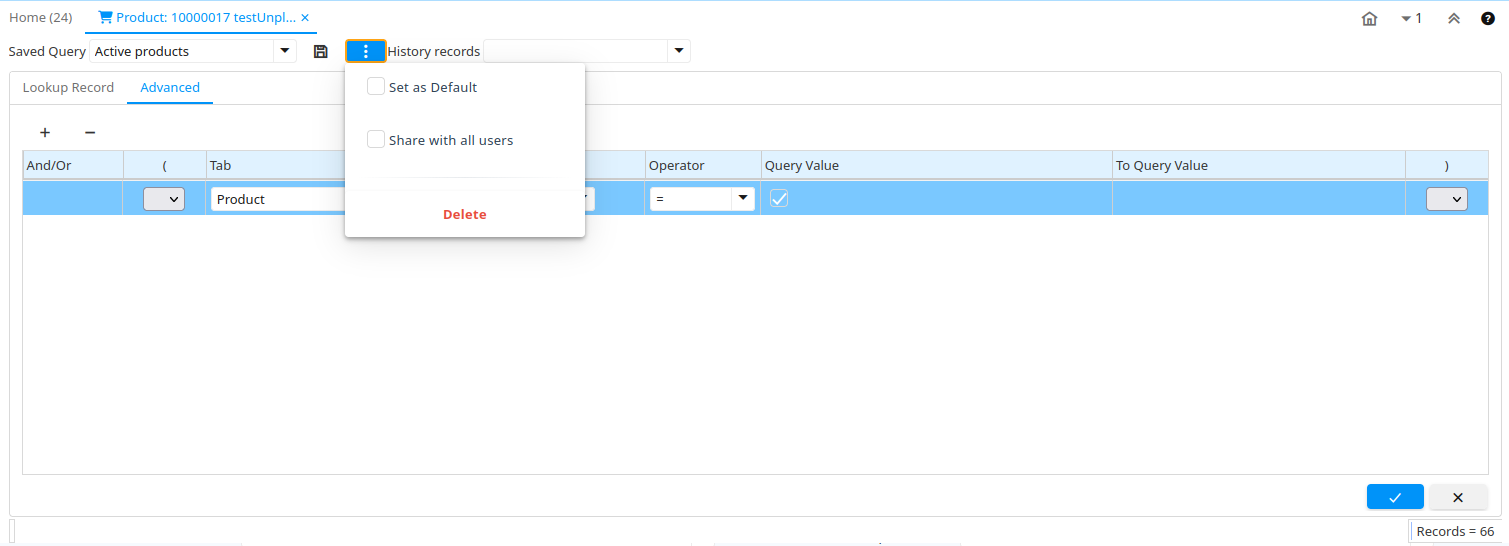
A new feature has been added to the Find Window that allows users to manage saved queries more efficiently. A context menu next to the Save button provides quick actions such as setting the default, sharing queries, and deleting them.
New UI Components
- An Advanced Options button is now available next to the Save button in the Find Window.
- Clicking the button opens a popup menu with query management options.
Available Options
The context menu includes the following options:
| Option | Description |
|---|---|
| Set as Default | Sets the selected query as the default for the current user. It will automatically load when opening the Window. |
| Share with all users | Shares the query globally across users, based on role/permission checks. Only available to users with sufficient privileges. |
| Delete | Deletes the currently selected saved query. A confirmation dialog is shown before deletion. |
Note: The Share with all users option is only visible and enabled for users with the appropriate roles (e.g. administrators).
Source: Wiki