Run Script with 2Pack
When could you use scripts with 2Pack?
- Automate post-installation tasks:
Run database updates, clear caches, or trigger processes automatically after importing a package. - Environment-specific configuration:
Set up or adjust system parameters, create directories, or configure files based on the target environment. - Data migration and cleanup:
Move, transform, or clean up data as part of a deployment. - Integration with external systems:
Call APIs, send notifications, or interact with other services during package installation.
Real Example Scenarios:
- After importing a new module, automatically run a script to initialize default data.
- Clean up temporary tables or reset caches to ensure new features work as expected.
- Configure system settings or user roles specific to a client or environment.
- Trigger a shell script to restart a background service after deploying a plugin.
iDempiere's Pack In (2Pack) functionality supports running scripts during import. Two types of scripts are supported:
- Shell Scripts
- JSR223 Scripts (such as Beanshell or Groovy)
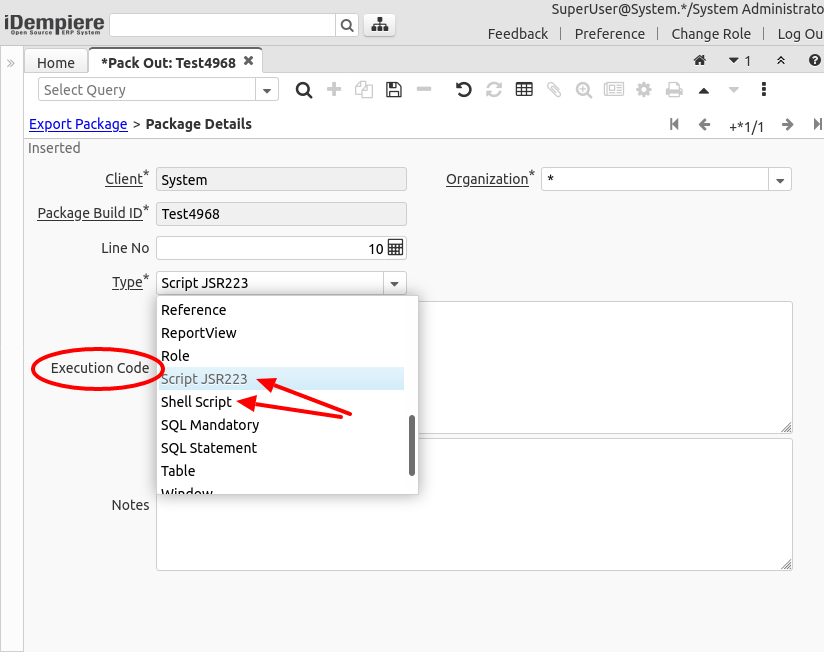
When defining the Pack Out, there are two new options available:
- Script JSR223 – Allows execution of JSR223 scripts using Beanshell or Groovy
- Shell Script – Executes a shell script on the server
When one of these options is selected, an Execution Code field appears for entering the desired script.
Shell Script
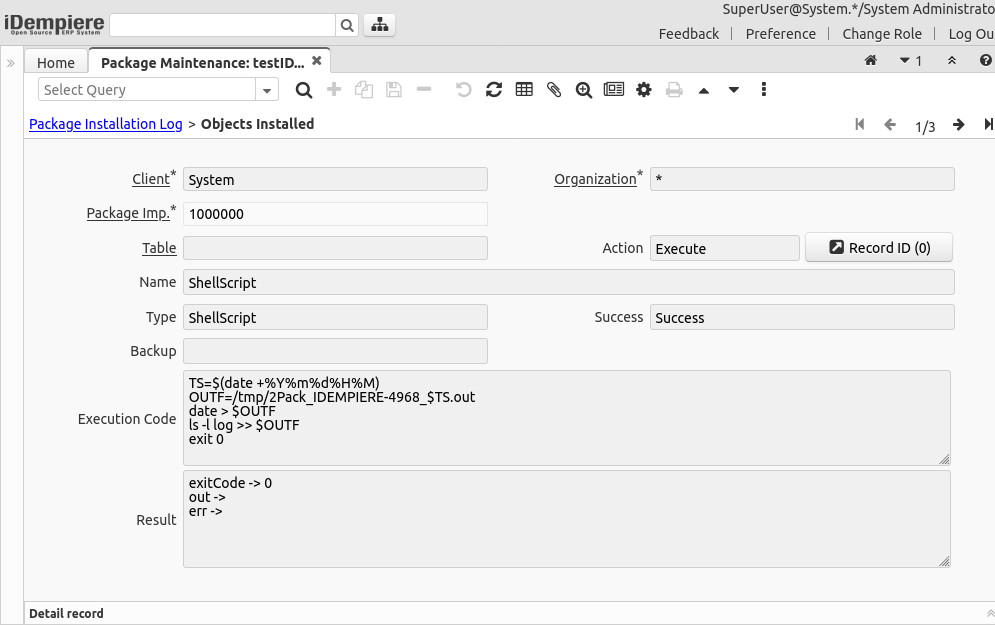
When running a shell script, the Pack In process creates a temporary file on the server (e.g. 2PackShellScript_[random].sh) and executes it.
Example:
TS=$(date +%Y%m%d%H%M)
OUTF=/tmp/2Pack_IDEMPIERE-4968_$TS.out
date > $OUTF
ls -l log >> $OUTF
exit 0
JSR223 Scripts
- Beanshell
- Groovy
By default, JSR223 scripts are executed using Beanshell, a Java-like scripting language.
Example: Run Initial Client Setup process
import java.text.SimpleDateFormat;
import java.util.Date;
import org.adempiere.util.ProcessUtil;
import org.compiere.process.ProcessInfo;
import org.compiere.process.ProcessInfoParameter;

ProcessInfo pi = new ProcessInfo("Initial Client Setup", 53161);
pi.setAD_Client_ID(A_AD_Client_ID);
pi.setAD_User_ID(A_AD_User_ID);
pi.setClassName("org.adempiere.process.InitialClientSetup");
String timeStamp = new SimpleDateFormat("yyyyMMddHHmm").format(new Date());
pi.setParameter(new ProcessInfoParameter[] {
  new ProcessInfoParameter("ClientName", "Test Client " + timeStamp, null, null, null),
  // ...other parameters...
});
ProcessUtil.startJavaProcess(A_Ctx, pi, A_Trx, false);
result = pi.getSummary();
Another Example: Reset Cache on AD_Column
org.compiere.util.CacheMgt.get().reset("AD_Column");
To use Groovy, add the comment @script:groovy.
Beanshell may not support custom classes from external plugins. Groovy does.
Example: Delete all records from T_Report for current client
/* @script:groovy */
import org.compiere.util.DB;

String sql = "DELETE FROM T_Report WHERE AD_PInstance_ID IN (SELECT AD_PInstance_ID FROM AD_PInstance WHERE AD_Client_ID=" + A_AD_Client_ID + ")";
int no = DB.executeUpdate(sql, A_TrxName);
result = "OK, deleted " + no + " rows from table T_Report";
Logging 2Pack Execution
To improve traceability, a logging option is available in the Package Maintenance window. Enable it to view script execution details during 2Pack import.